Cinematic AI images are digital creations that replicate the look, feel, and emotion of movie scenes. Unlike standard AI images, cinematic images focus on lighting, atmosphere, composition, and storytelling, creating visuals that are epic, dramatic, or highly immersive. Whether you’re a designer, content creator, or just an AI enthusiast, knowing the right prompts can transform your image generation results.
In this guide, you’ll learn how to craft cinematic prompts effectively, along with 3 ready-to-use examples in the best format for AI image generation.
1. What Makes an AI Image “Cinematic”?
Before writing prompts, you need to understand what cinematic means in AI art:
A. Composition
Cinematic images often follow film framing techniques like:
- Rule of thirds
- Leading lines
- Depth and perspective
B. Lighting
Lighting sets the mood. Common cinematic lighting types include:
- Golden hour sunlight
- Neon reflections in a rainy street
- Dramatic shadows and high contrast
C. Color Grading
Movies use color to evoke emotion. AI prompts can guide color palettes like:
- Teal and orange (action films)
- Dark desaturated tones (horror or mystery)
- Warm, soft pastels (romantic or fantasy)
D. Atmosphere
Adding fog, smoke, rain, dust, or cinematic lens effects makes images more believable and immersive.
2. Anatomy of a Perfect Cinematic AI Prompt
A high-quality cinematic prompt usually contains:
- Subject Description – Who or what is the focus
- Environment / Setting – Where the scene is taking place
- Lighting & Mood – Type of light, time of day, emotional tone
- Camera & Perspective – Angle, lens, depth of field
- Artistic Style / References – Realistic, concept art, digital painting, photorealistic, 8k resolution
- Optional Enhancements – Motion blur, bokeh, cinematic grading
Formula:
[Subject] in [Environment] with [Lighting] using [Camera angle/lens] in [Artistic style], [Optional enhancements]
3. 3 Ready-to-Use Cinematic Prompts
Here are 3 prompts crafted for immediate use in AI generators. They follow the above formula and are optimized for cinematic quality.
Prompt 1: Cyberpunk Cityscape
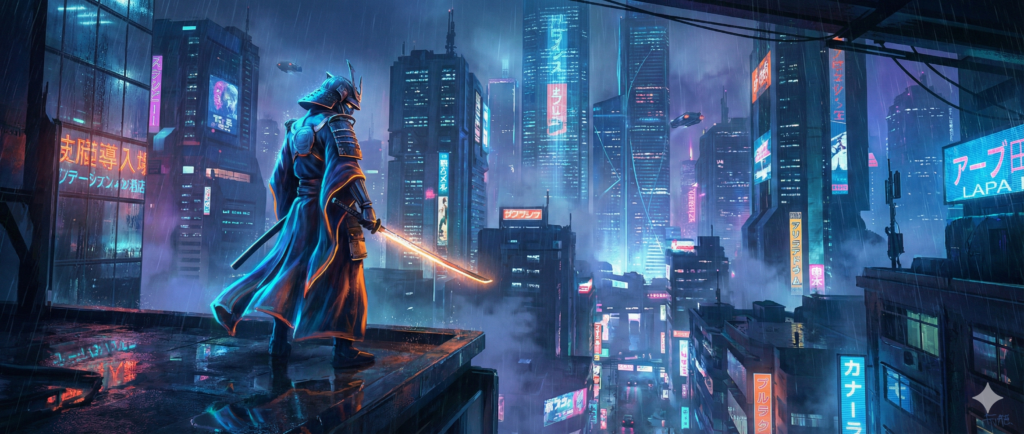
A lone futuristic samurai standing on a neon-lit rooftop, overlooking a rainy cyberpunk city at night, dramatic reflections on wet streets, cinematic lighting with blue and orange contrast, low-angle shot, wide lens, highly detailed 8k digital painting, volumetric fog, neon signs glowing, cinematic depth of field
Why it works:
- Subject: Lone samurai
- Environment: Neon-lit rooftop / cityscape
- Mood: Dramatic, rainy, reflective
- Camera: Low-angle, wide lens
- Style: 8k digital painting, high detail
- Enhancements: Volumetric fog, cinematic depth
Prompt 2: Epic Fantasy Battle
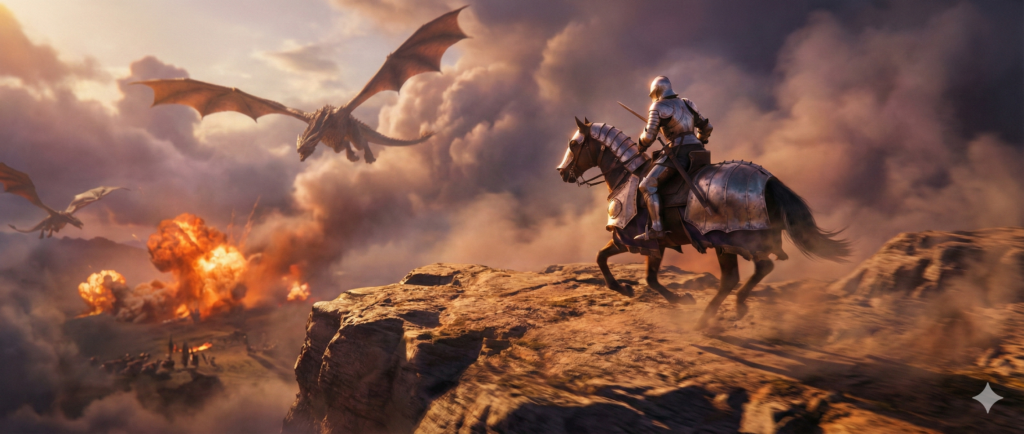
A heroic knight charging into battle on a cliff during sunrise, dragons flying in the sky, fiery explosions in the distance, golden hour cinematic lighting, aerial perspective, ultra-realistic 8k concept art, dramatic clouds, epic composition, motion blur, cinematic color grading
Why it works:
- Subject: Knight in battle
- Environment: Cliff, dragons, explosions
- Mood: Epic, heroic, intense
- Camera: Aerial perspective
- Style: Ultra-realistic concept art
- Enhancements: Motion blur, cinematic color grading
Prompt 3: Noir Detective Scene
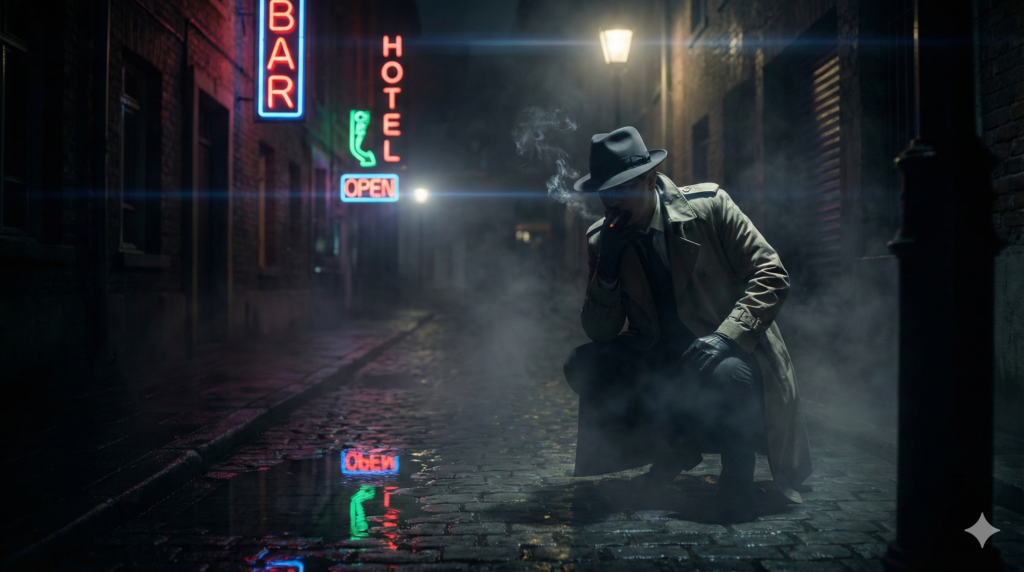
A detective in a foggy alley, neon signs reflecting on wet cobblestone, dramatic shadows, cinematic low-key lighting, smoke from cigarette, moody atmosphere, cinematic lens flare, medium shot, photorealistic 8k render, dark noir style, shallow depth of field, mysterious and suspenseful
Why it works:
- Subject: Detective
- Environment: Foggy alley, neon reflections
- Mood: Mysterious, suspenseful, noir
- Camera: Medium shot, shallow depth of field
- Style: Photorealistic 8k
- Enhancements: Smoke, lens flare, low-key lighting
4. Tips to Improve Your Cinematic Prompts
- Be Specific but Flexible – Use enough details for mood, subject, and lighting, but leave room for AI creativity.
- Use Style References – Adding terms like “photorealistic”, “concept art”, “octane render”, “cinematic 8k” improves output.
- Experiment with Camera Angles – Low-angle, bird’s-eye, over-the-shoulder shots create dramatic cinematic effects.
- Add Post-Processing Terms – Phrases like “color grading”, “depth of field”, “bokeh”, “motion blur” make images realistic and professional.
- Iterate & Refine – Slight changes in adjectives or camera descriptions can drastically improve the cinematic feel.
5. Advanced Cinematic Prompt Techniques
A. Multi-Prompt Approach
Break your prompt into main subject, environment, and style enhancements separated by commas.
Example:
Main subject: Warrior princess, Environment: Misty forest, Lighting: Early morning sun with volumetric rays, Style: 8k photorealistic, cinematic, lens flare, shallow depth of field
B. Prompt Weighting
Some AI tools allow weighting certain keywords. Example:
(Apocalyptic city:1.5), (sunset lighting:1.2), (heroic stance:1.3), cinematic 8k
- Numbers control importance → Subject stands out, lighting emphasizes mood
C. Combine References
Include famous cinematic or artistic references for style inspiration:
- “In the style of Blade Runner”
- “Inspired by Studio Ghibli lighting”
- “Like a Christopher Nolan shot”
6. Common Mistakes to Avoid
- Too vague: “City at night” → Adds nothing cinematic
- Too many subjects: Confuses AI
- Overloading adjectives: “Beautiful, stunning, amazing, epic” → AI may ignore meaning
- Ignoring camera/mood: Scene loses cinematic feel
7. Conclusion
Creating cinematic AI images isn’t magic—it’s knowing the elements of movies and translating them into precise AI prompts.
Key takeaways:
- Focus on subject, environment, lighting, camera, style
- Add cinematic enhancements like depth, fog, color grading
- Iterate your prompts—even small tweaks improve realism
- Keep it specific, readable, and cinematic
Using the 3 example prompts above, you can start generating stunning cinematic visuals immediately, whether for concept art, social media, storytelling, or personal projects.
Remember: the AI reflects the clarity of your prompt. The more you practice cinematic prompt writing, the more realistic, dramatic, and visually appealing your images will be.